

Agents are everywhere. Databricks ‘2026 State of AI Agents’ found that multi-agent systems grew 327% in less than 4 months based on data from over 20,000 organizations.
Entire companies are being formed around agents such as Sierra for customer support. Amazon is building synthetic environments so agents can learn new skills and improve. Your founder friend runs an entire business development function off her Mac Mini next to the dog bed under her desk.
How can you get your own?
Today we’ll try to demystify the concepts. It’s deliberately simple and aimed at the business leader who wants to get started.

What is an agent?
Agents aren’t magic.
They’re models with context, capabilities, instructions and a system for keeping them on track. The reason people use agents vs. building a new piece of software:
Agents can figure things out. Pursue an objective without prescribing every step.
Agents can take action. Use tools, interact with your systems, actually do things.
Agents can do things you can’t. Call skills you don’t possess.
Agents operate at a massive scale. Create 1,000 variants to your 5.
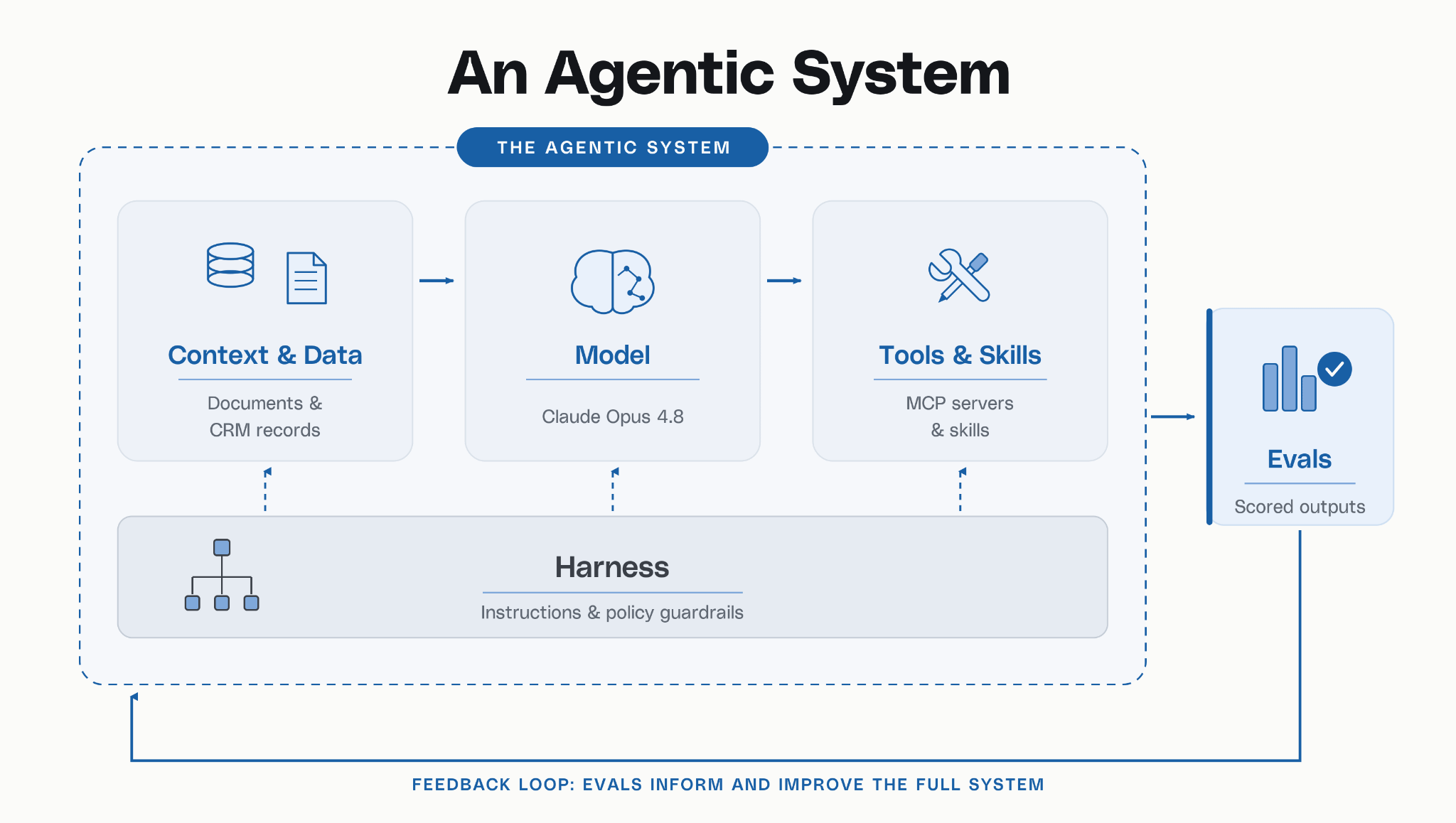
Core Pieces of Agentic System
Context & Data: what the agent knows
Model: how it reasons
Tools & Skills: what it can do and how it knows how to do it
Harness: how the whole thing runs
Evals: how you know it actually works
Context & Data
Agents need context and data to act. The nuance here is how agents access data. They can use normal sources like direct database reads or APIs. They can also read documents that you provide such as a Word Doc, PDF, Markdown files etc.
The most common standard today is MCP (Model Context Protocol). Anthropic created this. A slightly incorrect but easy way to think about this is a wrapper around an API. It gives the agent the ability to call tools and access data. You might see an MCP connection to Notion or Google Docs for example. It’s a standardized format an agent understands.
The MCP connection will give the agent access to your data in another platform.
Model
We covered this in How to Choose Your Frontier Model. This is your agent’s brain. Frontier models, hosted models, open source, it doesn’t matter. It’s how your agent reasons.
Tools & Skills
A tool gives an agent capability. A tool might be to read a PDF or build a spreadsheet.
A skill tells an agent how to perform a task. A skill could be to perform an analysis and write a report. A skill is ultimately a file. Anthropic’s documentation has a concise description.
“Each Skill packages instructions, metadata, and optional resources.”
Here’s an example skill.md file. It’s easy to read and straightforward.
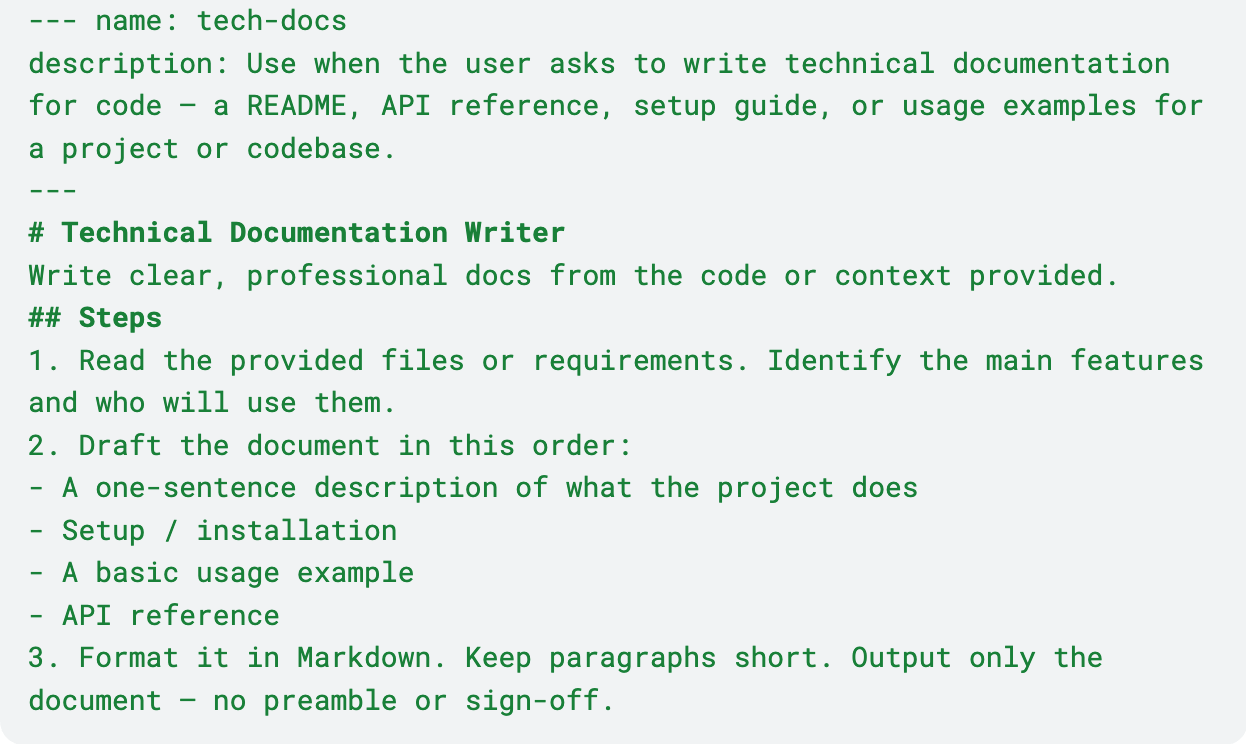
You’ll face a trade-off between how granular to make a skill. The more granular, the more precise. But that means headaches in debugging and maintenance. It’s more art than science.
Harness
The harness is exactly what it sounds like. It’s the runtime environment around the agent. It gives all the instructions on how to use skills, what to do / not to do, enforces policy, and importantly handles memory and prescribes actions.
Models have limited context windows (the amount of data you can shove in a prompt). They forget things between sessions and even chats. The harness can keep a running log of memory and compacts that into usable pieces that can be reinserted at specific times.
Evals
The most important part of your whole agent build is the eval loop. An eval loop takes the output of your agent and runs a series of repeatable tests.
The eval loop can check for simple things like data validity, scan for inappropriate language, and enforce policy rules. It creates a feedback loop for the agent. The eval tells the agent whether the output was good or bad and gives data signals for future improvement.
How do I build an agent?
All the major platforms have agent builders now – Google, Salesforce, Microsoft, OpenAI, Anthropic etc. For developers you can use CrewAI, LangGraph or n8n, which tend to be popular choices.
A prototype is as simple as following a tutorial. You can build one in 20 mins. At Atmosphere we did early prototypes by using Claude Code (an agent) inside of Replit (another agent) to build our own agent. A very matrix experience.
What surprised us was how well they worked. We combined AI web scans and data structuring with proprietary frameworks and instructions gleaned from 20 years of experience. We could produce much higher quality outputs than raw models alone. That process took a few months but was worth the effort in development and eval.
How do I move to production?
The easy part is getting an agent built. The harder part is getting an agent to run reliably at high quality, economically.
Moving into production requires several steps that need engineering expertise:
Context & Data: ensuring secure connections into your production software environments. For example connecting to your Microsoft or Salesforce data.
Model: understanding data policies of your model choice, for example no-training, enterprise SLAs, any regulatory or compliance needs from your company.
Tools & Skills: building persistent MCP connections with reliable data flow. Documenting and debugging all your skill.md files.
Harness: documenting your governance layers and ensuring the enforcement produces a reliable, compliant output via your evals.
Evals: a system for storing your evals and an interface for users at your organization to run continuous evals for reliability and improvement.
That’s a wrap on the series. We’ve moved from what AI actually is to mapping workflows, choosing tools and models, and now agents. Hope you enjoyed and best of luck with your AI implementation. If we can be helpful please reach out, hello@atmospherepartners.co